Overview
Chorus is data replication software designed for Object Storage systems. For exact information on supported Object Storage APIs and vendors, see:
When to Use Chorus
Migrate to a new S3 storage with zero downtime
You need to move from AWS S3 to self-hosted Ceph (or any S3-to-S3 migration) without stopping your application. Chorus Proxy sits in front of your storage, replicates data in the background, and switches traffic when ready.
Keep a synchronized backup of your S3 data
You want a live copy of your data in another storage for disaster recovery or compliance. Set up replication without the switch—Chorus continuously syncs changes to the follower storage.
Replicate from storage where you can't deploy a proxy
Your data is in a managed S3 service or OpenStack Swift storage where you can't intercept requests. Configure Chorus Worker to receive change events via webhooks — either S3 bucket notifications or Swift access-log events — and replicate changes to your destination storage.
Verify migration integrity
After migration, you need to confirm all objects were copied correctly. Use the diff check to compare buckets and identify any discrepancies.
How It Works
Chorus works by:
- Users inputting storage credentials into the Chorus configuration.
- Selecting one storage endpoint as the
mainwhile others becomefollowers. - Using Chorus's S3 API instead of the
mainstorage endpoint's API (after Chorus's S3 API has been configured and started) - Proxying Chorus requests to the
mainstorage endpoint and asynchronously replicating the data to thefollowerstorage endpoints. - Replicating all existing data from the
mainstorage endpoint tofollowerstorage endpoints in the background. - Supporting the configuration, the pausing, and the resumption of Data replication by user on a per-bucket basis with the web admin UI or CLI
Components
Chorus is structured around these main services:
Chorus Proxy- S3 proxy that captures changesChorus Worker- Processes replication tasks and webhook events
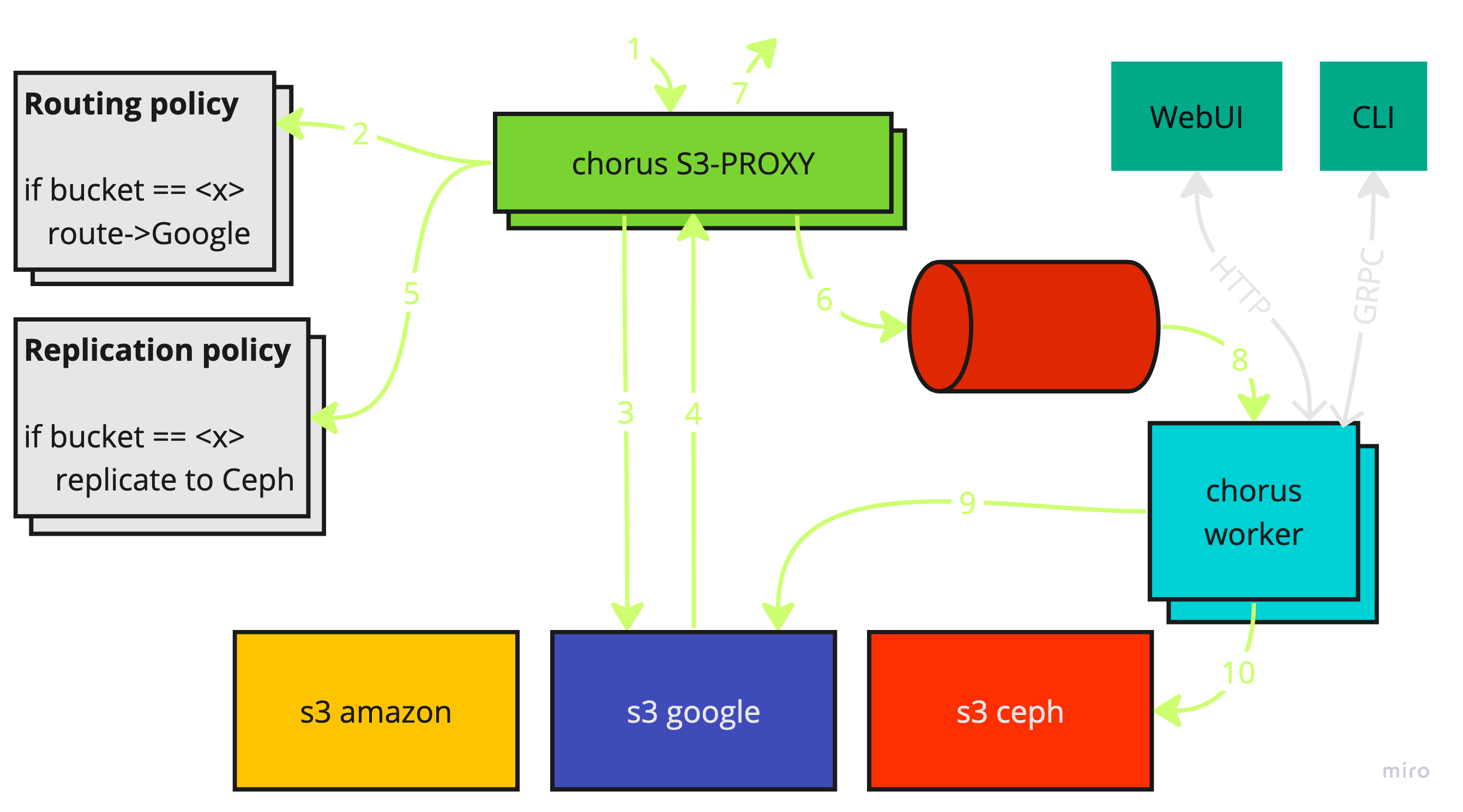
The Chorus Proxy operates as an intermediary for the main S3 storage
endpoint. This means that Chorus also provides an S3 API.
The Chorus Worker also accepts change events via webhooks as an alternative
to Proxy for environments where deploying a proxy is not feasible. Two event
sources are supported:
- S3 bucket notifications (Ceph): Chorus auto-configures SNS topics and bucket notifications. Supports bucket-level replication only.
- Swift access-log events: Requires an external log parser (e.g., Fluent Bit sidecar) to convert Swift proxy-server logs into webhook calls.
See Webhook Configuration for setup.
Here is the workflow for using Chorus Proxy (text such as -1- refers to the
numbered arrows in the above diagram):
- A request is sent to the Chorus S3 API
-1-. - The
Chorus Proxyredirects the request to themainstorage according to routing policy in config-2-3-4-7-. - For write requests (
{POST},{PUT},{DELETE}), the proxy creates a task directing changes to be copied from themainstorage endpoint tofollowerstorage endpoints according to replication policy-5-6-. - The
Chorus Workerretrieves the task and syncs changes from themainto thefollower-8-9-10-.
All changes generated by the proxy are stored in an event queue.
Chorus also has a initial replication feature for cases where the main S3
storage endpoint isn't initially empty. This allows Chorus to transfer existing
data to followers in the background. The initial replication process works as
follows:
- All buckets in the
mainstorage endpoint are listed. - All objects for all listed buckets in the
mainstorage endpoint are listed. - A task is created for each object: each object is synced from the
mainstorage endpoint to thefollowerstorage endpoint.. - The worker processes tasks in the background, copying or updating files as needed.
Features
- S3 and OpenStack Swift storage support
- User-level and bucket-level replication policies
- Routing policies and migration switch (Proxy only)
- PAUSE & RESUME replication
- Defining custom S3 credentials for
Chorus Proxy - Dynamic credentials management via API
- Syncing object/bucket metadata, content, tags, ACL
- Migrating existing data in background
- Tracking replication lag
- Data diff check between storages
- Per-storage rate limiting (requests per minute)
- Worker rate limiting (concurrent objects copies)